On this page
A lightweight server-side DataTables package for Laravel, inspired by Yajra DataTables.
Features
- Class-based tables with
php artisan make:datatable - Server-side search, sorting and pagination
- Works with the bundled vanilla JS table or DataTables.net
- Bring your own front-end assets (CDN, self-hosted or Vite) via config
- Output is HTML-escaped by default, with opt-in raw columns
- Fluent JSON API (
MiniDataTables::of(...)) for custom endpoints - Laravel auto-discovery
Requirements
- PHP 8.2+
- Laravel 10, 11, 12 or 13
Installation
composer require crushjs/mini-datatablesPublish the bundled CSS/JS (needed for the default style):
php artisan vendor:publish --tag=mini-datatables-assetsOptionally publish the config file:
php artisan vendor:publish --tag=mini-datatables-configClass-based tables
1. Create a table
php artisan make:datatable UserDataTable
php artisan make:datatable Admin/PostDataTable --model=Post
php artisan make:datatable UserDataTable --force   # overwrite an existing class
This creates app/DataTables/UserDataTable.php:
namespace App\DataTables;

use App\Models\User;
use Crushjs\MiniDataTables\MiniDataTable;

class UserDataTable extends MiniDataTable
{
    public function query()
    {
        return User::query();
    }

    public function columns()
    {
        return [
            ['data' => 'id', 'title' => 'ID'],
            ['data' => 'name', 'title' => 'Name'],
            ['data' => 'email', 'title' => 'Email', 'orderable' => false],
        ];
    }
}
Column options:
| Key | Default | Description |
|---|---|---|
data | — | Database column / JSON key |
title | data | Header text |
searchable | true | Include the column in the global search |
orderable | true | Allow sorting by clicking the header |
Set searchable and orderable to false for columns that are not real database columns.
Optional properties:
protected $style = 'datatables';     // default: config('mini-datatables.style')
protected $maxLength = 50;           // default: config('mini-datatables.max_length')
protected $rawColumns = ['action'];  // columns returned as HTML (not escaped)
protected $tableId = 'users-table';  // default: kebab-cased class name
2. Controller
use App\DataTables\UserDataTable;

class UserController extends Controller
{
    public function index(UserDataTable $datatable)
    {
        $datatable->style('datatables'); // optional

        if (request()->ajax()) {
            return $datatable->ajax();
        }

        return $datatable->render('users.index');
    }
}
3. Blade view
<!DOCTYPE html>
<html>
<head>
    <title>Users</title>
    {!! $datatable->styles() !!}
</head>
<body>
    {!! $datatable->table() !!}

    {!! $datatable->scripts() !!}
</body>
</html>
Each table gets its own id, so you can show several tables on one page.
Security
- Search conditions are grouped, so scopes in
query()(e.g.where('company_id', ...)) are always respected. %and_in search terms are matched literally.- Page size is capped by
max_length. - Sorting only uses columns marked
orderable. - All string values are HTML-escaped. List columns that intentionally contain HTML in
$rawColumns, and make sure you escape any user data inside them yourself.
Configuration
config/mini-datatables.php:
return [
    'style' => 'default',
    'max_length' => 100,

    'styles' => [
        'default' => [
            'driver' => 'mini',
            'css' => ['vendor/mini-datatables/table.css'],
            'js' => ['vendor/mini-datatables/table.js'],
        ],

        'datatables' => [
            'driver' => 'datatables',
            'css' => [
                ['url' => 'https://cdn.datatables.net/2.3.8/css/dataTables.dataTables.css', 'integrity' => 'sha384-...'],
            ],
            'js' => [
                ['url' => 'https://code.jquery.com/jquery-3.7.1.min.js', 'integrity' => 'sha384-...'],
                ['url' => 'https://cdn.datatables.net/2.3.8/js/dataTables.js', 'integrity' => 'sha384-...'],
            ],
        ],
    ],
];driver—mini(bundled JS) ordatatables(DataTables.net, initialised for you).css/js— files printed bystyles()/scripts(). Each entry is a URL string, or an array withurland optionalintegrity/crossorigin(Subresource Integrity). Relative paths go throughasset(); full URLs are used as-is.- If you change a CDN version, update or remove its
integrityhash, otherwise the browser will block the file.
Avoiding conflicts with your own scripts
- Already loading jQuery? Remove the jQuery entry. Loading jQuery twice replaces
window.jQueryand drops any plugins (Select2, etc.) registered on the first copy. - Several tables on one page? Each asset URL is printed only once per request, and each table is initialised only once.
- Vite / npm? Set
cssandjsto[]and expose jQuery globally in your bundle (window.$ = window.jQuery = $andimport 'datatables.net'). The init script waits forDOMContentLoadedand useswindow.jQuery, so it works with deferred module scripts and withjQuery.noConflict(). - Content Security Policy? If your app calls
Vite::useCspNonce(), the same nonce is added to every tag the package prints.
Use your own assets (npm / Vite / self-hosted)
If you already load jQuery and DataTables yourself, empty the lists and only the init script is printed:
'datatables' => [
    'driver' => 'datatables',
    'css' => [],
    'js' => [],
],
Add another theme
'bootstrap5' => [
    'driver' => 'datatables',
    'css' => ['https://cdn.datatables.net/2.3.8/css/dataTables.bootstrap5.css'],
    'js' => [
        'https://code.jquery.com/jquery-3.7.1.min.js',
        'https://cdn.datatables.net/2.3.8/js/dataTables.js',
        'https://cdn.datatables.net/2.3.8/js/dataTables.bootstrap5.js',
    ],
],$datatable->style('bootstrap5');Fluent JSON API
For custom JSON endpoints, use MiniDataTables::of() (or the MiniTable facade). It works with Eloquent and DB::table() queries.
use App\Models\User;
use Crushjs\MiniDataTables\MiniDataTables;

Route::get('/users', function () {
    return MiniDataTables::of(User::query())
        ->search(['name', 'email'])      // reads ?search=
        ->sort(['id', 'name'])           // reads ?sort=name&direction=asc
        ->paginate(10)                   // reads ?page=
        ->addColumn('action', fn ($user) => '<button>Edit</button>')
        ->editColumn('name', fn ($user) => strtoupper($user->name))
        ->rawColumns(['action'])
        ->make();
});
Search
->search('name')                    // value from ?search=
->search(['name', 'email'])         // any of these columns
->search('name', 'john')            // explicit value
Sort
->sort()                            // ?sort=id, default: id desc
->sort(['id', 'name', 'email'])     // allowed columns; the first one is the default
->sort(['created_at'], 'asc')       // default direction
Only columns in the list can be sorted by ?sort=; anything else falls back to the default.
Response
{
  "data": [
    { "id": 1, "name": "JOHN", "action": "<button>Edit</button>" }
  ],
  "meta": { "current_page": 1, "last_page": 3, "per_page": 10, "total": 25 }
}
meta is only included when paginate() is used.
Local development
git clone https://github.com/crushjs/mini-datatables.git
cd mini-datatables
composer install
composer test
To try it inside a Laravel app, add a path repository to the app's composer.json:
"repositories": [
    { "type": "path", "url": "../mini-datatables" }
]composer require crushjs/mini-datatables:@devPackage structure
mini-datatables/
├── config/mini-datatables.php
├── resources/
│   ├── css/table.css
│   ├── js/table.js
│   └── views/table.blade.php
├── src/
│   ├── Concerns/
│   ├── Console/MakeDataTableCommand.php
│   ├── Facades/MiniTable.php
│   ├── Html/Builder.php
│   ├── MiniDataTable.php
│   ├── MiniDataTables.php
│   └── MiniDataTablesServiceProvider.php
└── tests/
Roadmap
- Multi-column sorting in the bundled JS
- Export CSV / Excel
- API Resources
- Vue / React support
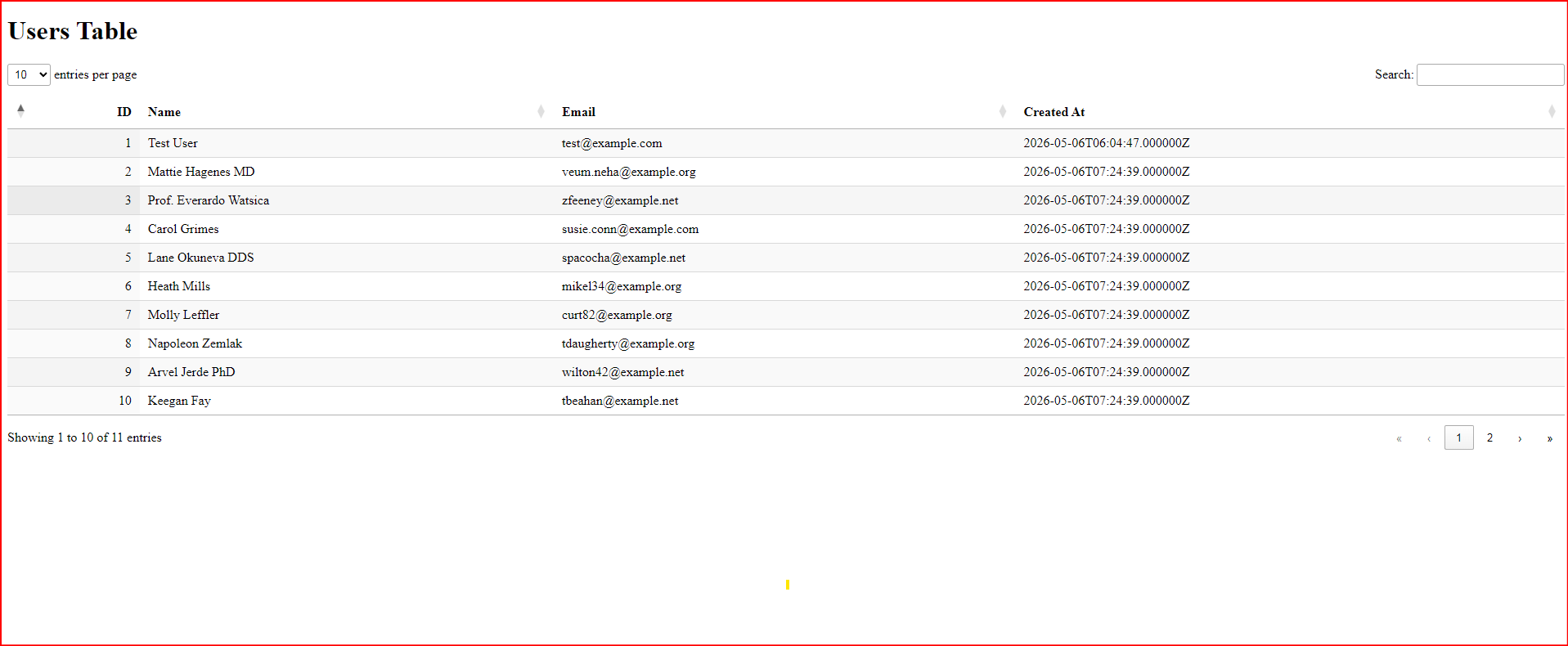
Screenshots
License
MIT — Crushjs